


SafePal: Crypto Wallet BTC NFT
4.51.15K Reviews
App Specs
- Version
- 4.11.8
- Updated On
- License
- Free
- Downloads
- 5,000,000+
- Developer
- SafePal Wallet
- Categories
- Finance
- Platform
- Android, iOS
Screenshots
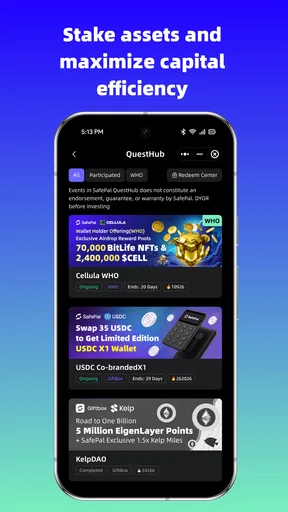
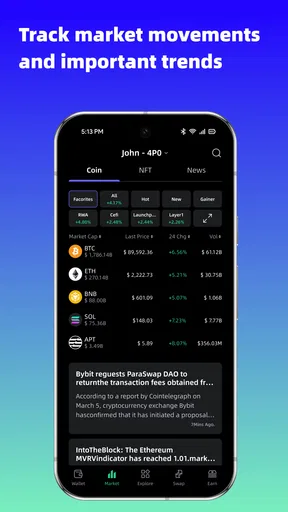
 Analysis by AppCompare
I judge a crypto wallet not only by how many assets it can handle, but by how comfortably I can use it when I’m tired, distracted, or still learning. SafePal: Crypto Wallet BTC NFT is a finance app from SafePal Wallet for keeping cryptocurrency and NFTs together in one place. Its broad reach is clear: it has more than five million installs and an average rating of 4.6 from around 127,000 ratings. That popularity is useful context, but it doesn’t tell me whether the app will suit your habits or make every task easy.
Readable screens, but a lot to take in
The app’s appeal is partly its attempt to make a complicated subject feel manageable. Wallets, settings, and transactions are separated into familiar areas, which gives me a reasonable place to begin instead of presenting every decision at once. Still, a cryptocurrency wallet can show unfamiliar names, balances, and network details. A tidy interface helps, but it cannot make those concepts self-explanatory. I’d take time to learn what each screen means before moving funds, rather than treating a clean layout as proof that every action is simple.
SafePal’s wide token coverage is most useful when you actually hold assets across different networks or want to keep crypto and collectibles in one app. The trade-off is that breadth can make a wallet feel busier than a basic app built around one familiar coin. If you only need a place to check a small Bitcoin balance, a simpler wallet may be easier to understand. If you want one hub for a more varied collection, the extra scope may justify that learning curve.
Motor and sensory comfort depends on your routine
For everyday use, the uncluttered design and biometric login can reduce repeated typing and make returning to the app feel less cumbersome. That is helpful if you regularly check balances or review activity on a phone. Biometric access is a convenience, though, not a replacement for understanding account recovery and keeping sensitive wallet information secure. I would set up a careful backup routine before relying on quick access as my only plan.
Crypto tasks also ask for attention in ways that ordinary browsing does not. A rushed tap can have consequences, and transaction details deserve a deliberate read. I find it sensible to pause before confirming a transfer, especially when copying an address or choosing a network. If small controls, dense financial information, or frequent visual checks are difficult for you, try the app with low-stakes browsing first and see whether its screens work comfortably on your device. A wallet should fit the person using it, not just the person who can move through it quickly.
Useful at home, less forgiving when you’re rushed
A realistic routine might be checking a transfer while commuting, then waiting until you are somewhere calm to make a decision. SafePal’s transaction history and status updates can help you follow activity without switching between separate tools, but I would not use a crowded platform or a distracted moment to send funds. For an NFT owner, keeping collectibles alongside other assets can also make a quick portfolio check more convenient. Convenience is strongest when it reduces app-hopping; it should not encourage hurried approvals.
Compared with a basic single-purpose wallet, SafePal is more appealing if you want cryptocurrency and NFT management in the same environment and expect to explore a broad range of tokens. Compared with a wallet designed around offline storage, a mobile app is easier to reach but may not be the right sole home for assets you intend to leave untouched for a long time. SafePal’s cold-storage options may matter to people planning a more cautious setup, but I would first learn exactly how the chosen storage arrangement works and what steps are needed to access funds later.
Worth Reading Before You Choose

EA SPORTS FC Mobile 26 Is a Bigger Football Game, but It Takes Time

Flipboard Shows What News Apps Must Do Beyond the Feed

Switching to Android Auto Means Rethinking Your Driving Routine

Google Calendar Makes a Crowded Week Easier to Manage

Ludo King Makes the Most of the Minutes Between Plans

Baby Panda World Brings Quick Play to Modern Phones, but Its Game Library Feels Busy
Small habits that make a broad wallet easier to manage
I’d start by adding or viewing only the assets I actually use, rather than trying to make sense of a large collection on day one. When reviewing a transaction, I’d check the destination and network as well as the amount; those details matter more than a polished summary screen. I’d also treat transaction history as a record to inspect, not as a guarantee that a transfer is complete simply because I can see it in the app. These habits make a multi-asset wallet more manageable and help separate routine checking from actions that deserve extra care.
If you are deciding whether to install it, ask yourself what you want the wallet to do. Someone who holds different tokens, follows NFT activity, and appreciates having related tasks together may find the range worthwhile. Someone who wants a very simple first step into crypto, rarely makes transactions, or prefers keeping long-term holdings away from a frequently used phone may be better served by a narrower or more deliberately offline arrangement. I would not choose a wallet solely because it supports many assets; I would choose it because its workflow matches the way I plan to use and protect them.
Getting Started with SafePal
The first thing you’ll notice when you download SafePal: Crypto Wallet BTC NFT is how user-friendly it is. The installation process is straightforward, which is a relief because, let's be honest, some crypto apps feel like you need a degree to set up. SafePal keeps it simple, and within minutes, you're ready to go.
A Sleek, Intuitive Interface
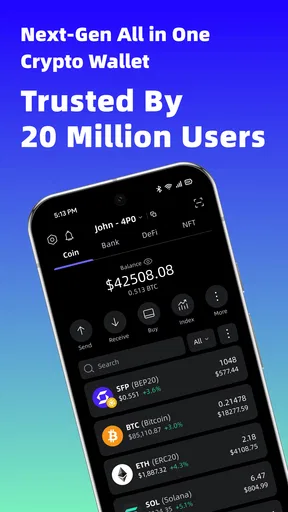
Once you're in, the interface is pretty sleek. Everything is where you'd expect it to be, with easy navigation between wallets, settings, and transactions. The design is uncluttered, allowing you to focus on what matters most—your crypto assets. Plus, the app supports a wide array of cryptocurrencies, not just the big names like Bitcoin and Ethereum.
Security Features
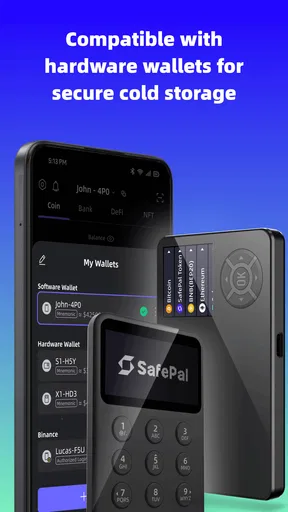
Security is paramount when dealing with digital assets, and SafePal doesn’t skimp on this front. It offers a secure, encrypted environment for your funds. One of the features I really appreciate is the biometric login. It gives me peace of mind knowing that my assets are protected by more than just a password. Additionally, the app provides cold storage options, which is a huge plus for those who want to keep their crypto offline.
NFT Support
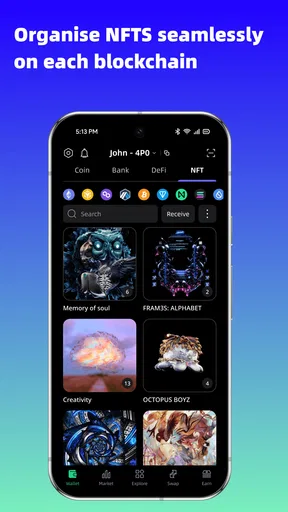
Now, if you're into NFTs, you're in for a treat. SafePal supports NFT management, allowing you to store and manage your digital collectibles effortlessly. This is particularly handy as NFTs continue to explode in popularity. The app integrates this feature seamlessly, so you won't feel like you're juggling between different platforms.
Transaction Management
Managing transactions with SafePal is a breeze. The app provides detailed transaction history and real-time updates. I found the ability to track transactions in real-time particularly useful, especially when dealing with volatile markets. Plus, the app’s transaction fees are competitive, which is always a bonus.
Catering to Both Novices and Pros
Whether you're a crypto newbie or a seasoned investor, SafePal has something for you. The app includes educational resources and guides, which are perfect if you're just starting out. For those who are more experienced, the advanced features and analytics tools are a great way to keep track of your portfolio’s performance.
Customer Support
Let's face it, even the best apps can hit a snag. That's why customer support is crucial. SafePal offers a responsive support team that’s ready to help. Although, to be honest, I haven't needed to reach out much, as the app runs smoothly. But it’s good to know that help is just a few taps away if needed.
Practical details before you decide
SafePal is free to install, is rated for everyone, and its current version is 4.10.9; it runs on Android 7.0 or later. Optional in-app purchases range from about fifty cents to five dollars per item. I’d think of those purchases as a reason to review any prompt before confirming it, not as a requirement for deciding whether the wallet’s basic workflow suits me. The app has been available since May 2019, and its 1,100-plus written reviews offer another perspective alongside the larger pool of ratings.
One question many first-time users have is whether they need to own an NFT or a long list of tokens to benefit. They do not: the main advantage is having room to manage varied assets, not a requirement to use every capability. Another practical question is whether the app is right for long-term storage. That depends on how you configure and protect your wallet; I would compare the convenience of phone access with the discipline and access steps of a more offline setup before placing substantial holdings anywhere.
I’d also separate portfolio tracking from trading decisions. Seeing balances and transaction activity in one place is useful, but it doesn’t remove the need to check network details, understand fees, and consider market risk before acting. If you are new, I’d use the guides to build familiarity, then begin with a small, deliberate task rather than moving a large amount just to test the interface. This is a more meaningful way to discover whether the navigation and confirmation steps feel clear to you.
On the accessibility side, the app’s familiar sections and biometric login may make routine access less demanding for some people, while the financial terminology and careful confirmation steps can still create friction. I would not assume that a phone wallet is equally comfortable for every visual, motor, or sensory need. Try reading the screens in your usual lighting and holding position, and consider whether you can reliably review transaction details without rushing. The right choice is the one you can use attentively, not simply the one with the broadest feature set.
In day-to-day use, I would keep a simple personal checklist: verify the asset, destination, and network; pause if anything looks unfamiliar; and keep recovery information protected and separate from casual notes. That routine is particularly valuable when moving between token management, collectibles, and transaction history, because convenience can make different tasks feel deceptively similar. A few seconds of deliberate checking are a fair trade for avoiding preventable mistakes.
SafePal is a finance app from SafePal Wallet, and its wide reach is reflected in more than five million installs. Its combination of token and NFT management, transaction tracking, and cold-storage options makes it worth considering for people who want a flexible crypto workspace. I’d be more cautious about recommending it as the only solution for someone who values the simplest possible interface or wants an entirely hands-off way to store assets. The strongest fit is a curious user willing to learn the workflow and take security steps seriously.
In conclusion, SafePal: Crypto Wallet BTC NFT is a robust, versatile wallet that caters to a broad spectrum of crypto users. With its strong security features, user-friendly interface, and comprehensive support for both cryptocurrencies and NFTs, it’s a solid choice for anyone looking to manage their digital assets effectively. Whether you're just dipping your toes into the crypto pool or you're a seasoned trader, SafePal has got you covered.
Pros
- Supports multiple cryptocurrencies efficiently.
- User-friendly interface for beginners.
- Cold wallet ensures enhanced security.
- Regular updates with new features.
- Offers seamless integration with NFT platforms.
Cons
- Limited customer support options available.
- Occasional sync issues with certain blockchains.
- No desktop version
- mobile-only app.
- Some advanced features lack detailed tutorials.
- Transaction fees can be higher than competitors.
FAQs for SafePal: Crypto Wallet BTC NFT
What is SafePal: Crypto Wallet BTC NFT used for?
SafePal is a comprehensive crypto wallet designed to store, manage, and trade a wide range of cryptocurrencies and NFTs. It supports various digital assets, ensuring secure transactions and easy access to your portfolio. The app offers an intuitive interface for both beginners and experienced users, focusing on security and convenience.
How secure is SafePal for storing cryptocurrencies and NFTs?
SafePal prioritizes user security with advanced encryption methods and a secure hardware wallet option. It employs a decentralized structure, meaning your private keys are stored locally on your device. Additionally, it features biometric authentication and PIN protection to safeguard your assets from unauthorized access.
Can I trade cryptocurrencies directly within SafePal?
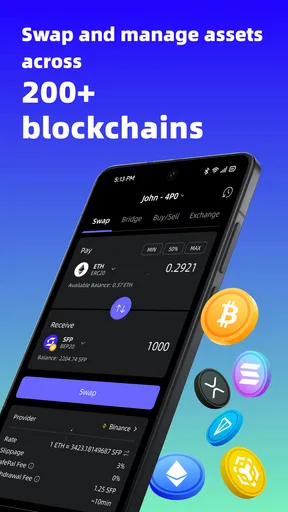
Yes, SafePal allows users to trade cryptocurrencies directly within the app. It integrates with major exchanges, enabling seamless transactions without needing to move funds to another platform. This feature provides convenience and efficiency, making it easy to manage and grow your crypto portfolio.
Does SafePal support a wide range of cryptocurrencies and NFTs?
SafePal supports a vast array of cryptocurrencies and NFTs, ensuring versatility for its users. It is compatible with popular coins like Bitcoin, Ethereum, and Binance Coin, as well as various blockchain networks. This broad support allows users to manage diverse assets in one place.
Is SafePal user-friendly for beginners?
SafePal is designed with a user-friendly interface that caters to both beginners and seasoned crypto enthusiasts. It provides clear instructions and helpful resources to guide new users through the setup and management processes. The intuitive design ensures a smooth experience, making it accessible for all levels of expertise.


